| Protocol | Filename | Type | Size | Updated | |
 |
HTTP | claview.zip | ZIP | 0.9Mb | October 5, 2025 |
|
FTP | claview.zip | ZIP | 0.9Mb | October 5, 2025 |
| Clarion viewer v3.0: direct viewer for Clarion data files |
This tool allow to read/open the Clarion (.dat) and TopSpeed (.tps) data files on any computer.
An application don't use any external libraries (no BDE, no ODBC, no ADO etc) and you may run this tool on computer without any additional setup/install.
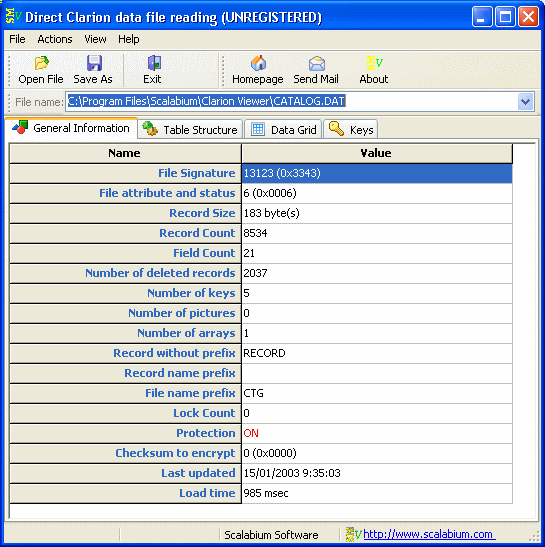
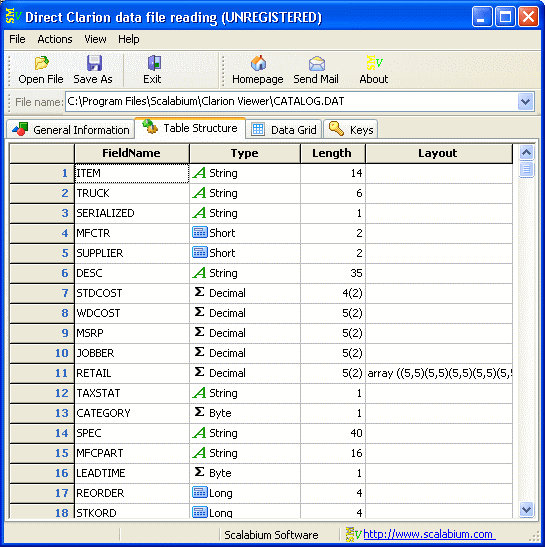
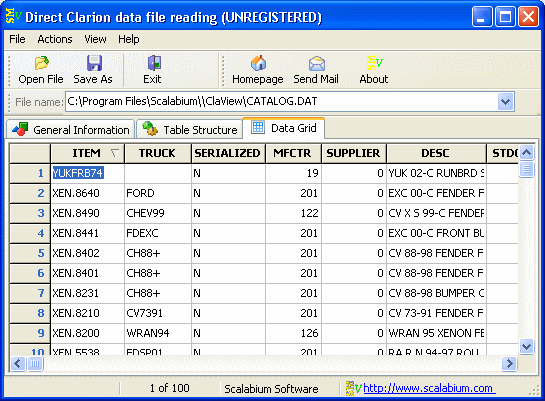
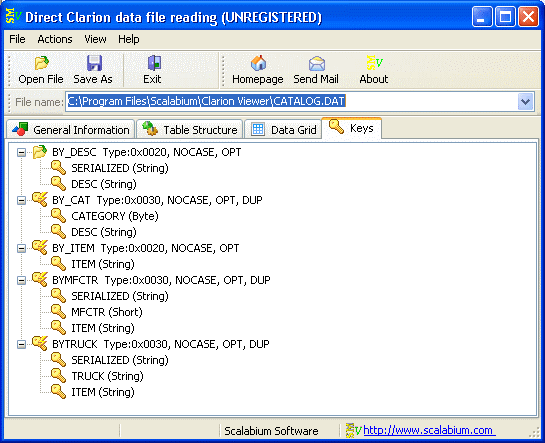
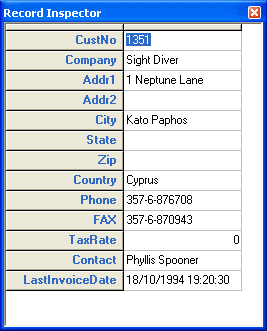
You may see the full Clarion system information (file version, header size etc), table structure and data in grid.
All field types supported (including MEMO, BLOB, graphic, array/group, rtf-formatted memo etc)
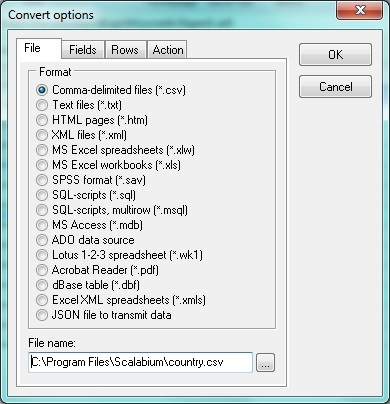
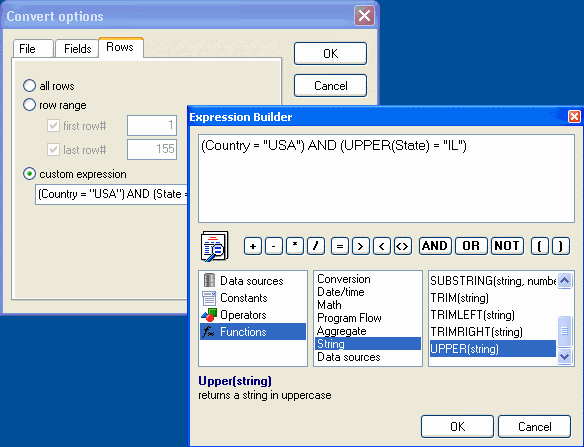
When Clarion file loaded, you may save the data to different file formats (CSV, Text, HTML, XML, MS Excel, MS Access, SPSS, SQL, dbf, JSON etc) or copy to clipboard. You may convert any Clarion data file into another file format without any programming in a few mouse clicks.
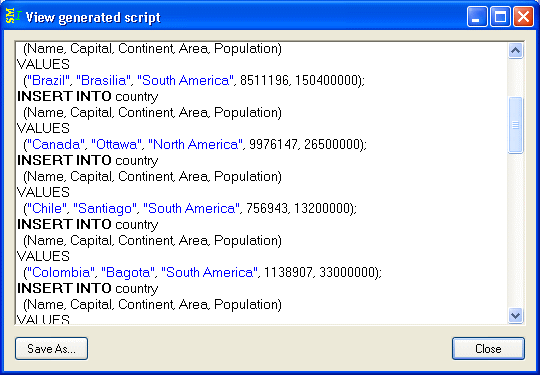
Additionally you may generate SQL-script with data dump.
All features are available via command-line arguments so you could automate any your tasks.
Multilingual support allows to translate the interface to any language
| Download |
You may use this version free-of-charge for 30 days only. If after 30 days you would like to continue using it, then you should purchase a license.
| Protocol | Filename | Type | Size | Updated | |
|
HTTP | claview.zip | ZIP | 0.9Mb | October 5, 2025 |
|
FTP | claview.zip | ZIP | 0.9Mb | October 5, 2025 |
The trial version have the next demo limitations:
After license purchase and activation of registered version (using personal serial number) the any limitations will be removed.
| Price |
| License fee | ||
| Quantity | Cost per unit | |
| personal | business | |
| 1-3 | 25 Euro | 40 Euro |
| 4-10 | 20 Euro | 32 Euro |
| more than 10 | 13 Euro | 20 Euro |
| site license | ||
| OEM, resale | ||
* one license allow to work with this software
on one computer only (one person). You need as many licenses as
the computers wherein our product will be installed and/or used.
** all prices are presented in US dollars but some registration
service have a multi-currency payment system with automatical
conversion into local currency (for example, in euros for Europe)
License types
Please note that we can issue a single-user license to a person name only. If you wish your license to be issued to an organization name, you should buy either a multi-user license or several single-user licenses.
| Order |
Products can be ordered online over the Internet using VISA, MasterCard or American Express credit card, Toll Free Phone, 24 Hour Fax, or Postal Mail at following sites:
| What you get when you register |
| Screenshots |
| Languages/Translations |
Clarion Viewer has localized interfaces in the next languages:
While usually a problem, font substitution can be a safety net. In high-security environments where downloading original fonts is forbidden, substitution allows you to read content without installing external software. Additionally, for visually impaired users, substituting a decorative font with a high-contrast sans-serif font (like Arial) improves accessibility.
You might be tempted to click "OK" and ignore the warning. That is a mistake. Here is what can go wrong:
Simply put: If you see "Download Font Substitution Will Occur," you are not viewing the document as the author intended.
| Issue | Description | |-------|-------------| | Line breaks change | Different character widths alter word wrapping. | | Page count shifts | Text reflows across pages or frames. | | Special characters lost | Bullets, dashes, or accented letters may display as “missing glyph” boxes (often “.notdef” or blank rectangles). | | Branding errors | Logos or headings lose their intended typographic identity. | | Overset text | Text may overflow its container without warning. |
"Download Font Substitution Will Occur" is not a suggestion or a minor info notice. It is a critical pre-flight alert that your document is about to be altered without your permission.
By understanding the causes (licensing, missing files, subsetting), recognizing the consequences (reflow, legal risk, brand damage), and applying the fixes (embedding, outlining, pre-flight checks, PDF/A), you transform this warning from a frustrating mystery into a solvable technical challenge.
Final Checklist Before Your Next Print Job:
The next time that dialog box appears, you will not just read it—you will act decisively, ensuring that what you designed is exactly what gets downloaded, printed, and presented to the world.
Need professional help with a document that persistently triggers font substitution? Consult a prepress specialist or consider converting your document to a high-resolution image format as a last resort. Your content is too important to leave to chance.
This warning typically appears in Adobe Acrobat, Microsoft Word, or AutoCAD when a document uses a font that is not installed on your current computer or is not properly embedded in the file
. This guide will help you resolve the warning and ensure your document looks as intended. 1. Fix Missing Fonts on Your System
If you are opening a file created by someone else, you likely lack the specific font files they used. Identify the Font: Open the document. In Adobe Acrobat, press (Windows) or (Mac) and click the tab to see which fonts are "Substituted". Install the Font:
Search for and download the missing font file (usually .ttf or .otf). Right-click the file and select Restart the App:
Close and reopen your software to allow it to recognize the newly installed font. 2. Prevent Substitution in PDF Files
If you are the creator, you can stop this warning for others by "embedding" the fonts directly into the PDF.
Don’t Let Your Design Fall Apart: Understanding "Font Substitution Will Occur" Download Font Substitution Will Occur
You’ve spent hours perfecting a layout, but the moment you open it on another machine or export it, a warning pops up: "Font substitution will occur." Suddenly, your elegant serif is replaced by a clunky system font, and your once-perfect text alignment is a mess.
Font substitution happens when your software can’t find the specific typeface used in a file and chooses a "best guess" replacement [21]. While it keeps your document readable, it can completely ruin your visual branding. Here is how to handle it like a pro. Why Does This Keep Happening?
The warning usually triggers because the required font files are missing from the local computer or weren't properly embedded into the document [19]. This is common when:
Moving between devices: You designed it on your desktop but opened it on a laptop that doesn't have the same font library.
Converting formats: Moving a DOCX to a PDF without embedding the fonts can lead to major rendering differences across different machines [6].
Using rare fonts: If you used a niche font from a specific foundry, other users likely won't have it installed [17]. How to Fix It (and Prevent It)
Depending on your software, here are the most effective ways to stop font substitution from ruining your work:
Install Missing Fonts: If you have the font file, simply add it to your system. On Windows, you can drag files into the C:\Windows\Fonts folder to install them globally [22].
Embed Fonts in the Document: Before saving, check your software settings. In Microsoft Word, go to File > Options > Save and check "Embed fonts in the file" to ensure the recipient sees exactly what you do [19].
Use "Preflight" for PDFs: If you're working in Adobe Acrobat, use the Preflight tool to "Embed missing fonts," which analyzes and fixes unembedded assets [24].
Upload to Support Files: For cloud-based tools like AutoCAD on the web, you can upload your font styles to the "Manage Support Files" section so they load correctly every time [14]. The Safe Bet: Web-Safe Fonts
If you want to avoid this headache entirely for digital content, stick to system fonts like Arial, Verdana, or Georgia. These are "web-safe" because they are installed on almost every device, ensuring your layout stays intact no matter where it's viewed [23].
Are you currently struggling with a specific software warning? Tell me which program you're using (like AutoCAD, Word, or Illustrator) so I can give you the exact steps to fix it.
"Download Font Substitution Will Occur" is a common printer warning indicating that the printer cannot find a specific font used in your document and will replace it with a similar one available in its memory. This usually happens when using high-quality PostScript drivers or specialized fonts that aren't natively stored on the hardware. Why This Happens
Missing Printer Fonts: The document calls for a font (e.g., a specific TrueType font) that isn't installed on the printer's hardware. While usually a problem, font substitution can be
Driver Settings: Many PostScript drivers are set to "Substitute with Device Font" by default to save processing time and memory.
Font Conflicts: The operating system may use one definition of a font (like Arial) while the printer uses its own built-in version, leading to slight visual discrepancies. How to Fix or Prevent It
If the substituted font looks incorrect or ruins your layout, you can bypass the error using these methods: Configuring a PostScript Printer to Avoid Font Substitution
The message "Download Font Substitution Will Occur" typically appears in software like AutoCAD when a drawing contains text styles using fonts that are not installed on your current system. This happens because the application cannot find the exact original font file and must swap it for a standard alternative (like simplex.shx) to display the text. Why This Happens
Missing SHX or TTF Files: The source drawing uses a specific font (e.g., a custom company font or an older AutoCAD font) that you don't have in your Fonts folder.
Extraneous Information: Sometimes, copying and pasting objects "drags along" style definitions from the original drawing's style tables, even if the specific object you're pasting doesn't use those fonts. How to Fix It
Locate Missing Fonts: Ask the sender of the file for the specific font files or check your company's shared font library.
Purge Unused Styles: Use the PURGE command in AutoCAD to remove any unused text styles that might be triggering the substitution warning.
Specify Support Paths: Ensure your font folders are included in the Support File Search Path under Options > Files.
Edit the Font Mapping File: You can modify the acad.fmp file to tell the software exactly which font to use as a substitute for the missing one, preventing the pop-up. For "Solid Piece" Users
If you are referring to a specific design project or a "solid piece" model that is displaying this error, it usually means the metadata of that piece includes a text style reference. Cleaning the file by purging or re-assigning text to a standard font like Arial or Romans often resolves the issue. If you’d like, let me know: Which software you are using (AutoCAD, MicroStation, etc.)? If you have the font files (.shx or .ttf) available? If this happens only with a specific file?
I can then provide step-by-step instructions to stop the error. Font substitution occurring for fonts not in selection
Report: Download Font Substitution Will Occur
Introduction
When working with documents, especially those created in Microsoft Office applications like Word, Excel, or PowerPoint, users often encounter a specific warning message: "Download Font Substitution Will Occur." This message indicates that the document contains fonts that are not installed on the system or the recipient's system, and to ensure compatibility and proper display, these fonts will be substituted with similar fonts available on the device. This report aims to explain the concept of font substitution, the reasons behind the occurrence of the "Download Font Substitution Will Occur" message, and the implications of this process on document formatting and sharing. Simply put: If you see "Download Font Substitution
Understanding Font Substitution
Font substitution is a process used by software applications to replace a requested font with another font when the requested font is not available. This process ensures that the document can still be displayed or printed, albeit with potentially different formatting than intended. Font substitution can occur in two contexts:
Reasons for "Download Font Substitution Will Occur"
The "Download Font Substitution Will Occur" message typically appears in scenarios where:
Implications of Font Substitution
While font substitution allows for the continued use and sharing of documents, it has several implications:
Best Practices to Minimize Font Substitution
To minimize the occurrence of font substitution:
Conclusion
The "Download Font Substitution Will Occur" message serves as a notification that a document's original formatting might be altered due to font incompatibilities. Understanding font substitution and taking proactive steps to minimize its impact can help ensure that documents are shared and viewed as intended across different systems and platforms. By following best practices and being aware of potential issues, users can more effectively manage document compatibility and maintain the integrity of their documents' formatting.
Here’s a strong review for the subject line "Download Font Substitution Will Occur" — depending on the tone you want (professional, warning, or user-friendly):
Step 1: Embed Fonts Properly from the Start
Step 2: Outline Your Text (Last Resort for Designers) If you are delivering a final logo or one-page flyer and cannot risk substitution, convert all text to outlines (shapes). Warning: This makes text uneditable, so preserve an editable copy.
The subject “Download Font Substitution Will Occur” sounds like a system error or a warning flag. While it’s honest, users may think something is broken. Consider softening to “Font Substitution May Apply After Download” unless substitution is guaranteed and problematic.
Free registration for translators
If you can help us maintain the customer support in your
native language, please drop us a line, and you'll get a free
registration (personal license)! Only please prior to starting the translation, you'll receive
instructions how to do this.
| See also |
You may try also the another our viewers and data conversion tools:
 Clarion to Text converter Clarion to MS Access converter
 TopSpeed to Text converter
 Paradox Viewer
 dBase Viewer
 DBISAM Viewer
 Advantage Viewer
 Paradox/dBase reader engine
(ActiveX)
Paradox/dBase reader engine
(ActiveX) Excel Viewer
 Metafile convert
 View Thumb.db
| Awards |


























 |

|
Copyright© 1998-2026, Scalabium
Software. All rights reserved. |