This website uses cookies

We use cookies to enable purchasing apps from our website, interacting with the help desk widget, analyzing the web traffic and commenting in blog posts. Our analytics partners gather anonymous information about how you use our site (ex: how many visitors we get a day, which pages are the most popular, etc) and may combine it with other information that you’ve provided to them or that they’ve collected from your use of their services. We do not use the collected information to create user profiles.

You consent to our cookies if you continue to use our website.

Musihacks.com -

Ultimate Mac Fan Control & Temperature Monitoring

Save 50% - was $20.
One-time payment

Requires macOS 10.13 or later

Supported macOS versions:
macOS 10.13 High Sierra - macOS 26 Tahoe

Latest Version:
TG Pro 2.100

Release Date:
December 14, 2025

Descriptive text for the image

Maximize your Mac's performance with TG Pro. This all-in-one solution provides comprehensive fan control and extensive temperature monitoring across a wide range of Mac models and processors. Monitor key components such as CPU, GPU, WiFi, drives, and battery (for laptop models), plus many others. Take control of cooling with both manual and automatic fan speed adjustments. TG Pro is fully compatible with macOS 26 Tahoe through macOS 10.13 High Sierra and natively supports both Intel and Apple Silicon (M1, M2, M3, M4 & M5 series) Macs. See the full list of Supported Mac Models.

Fan Control

Take complete control of your Mac's cooling system with TG Pro. Whether you prefer automated adjustments or hands-on control, TG Pro offers versatile options to suit your needs.

Auto Boost Rules: Smart Cooling

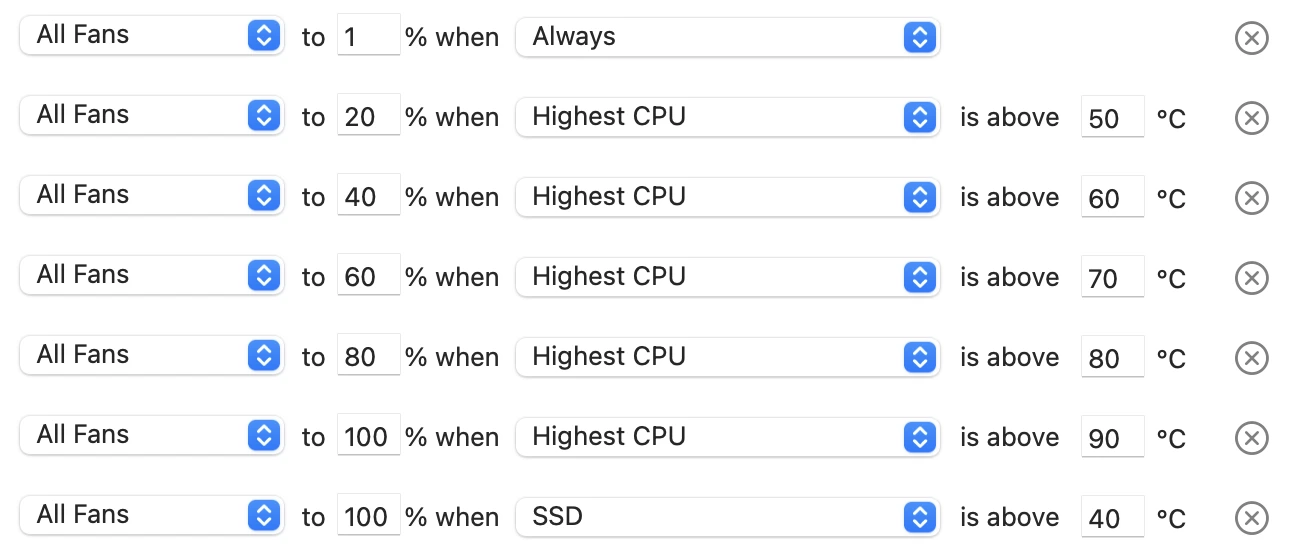
Configure custom rules to automatically adjust fan speeds based on a variety of temperature sensors, including CPU, GPU, and drives. Create a personalized fan curve to meet your specific cooling needs. With TG Pro managing the cooling, you're free to concentrate on your tasks

Screenshot illustrating Auto Boost rules in TG Pro's Fan settings for controlling fan speeds based on temperature thresholds.

Manual & Max: Immediate Cooling

Adapt your cooling approach with Manual and Max options, the availability of which depends on your Mac model and settings. For older Intel Macs, the Manual option is readily available. On newer Intel and Apple Silicon models, Max is enabled by default, with Manual becoming available once activated in TG Pro's fan settings.

Screenshot of the fan control area of the TG Pro main window, showing the use of manual control to modify the fan speeds.

Temperature Monitoring

Unlock a new level of awareness about your Mac's thermal performance with TG Pro. Gain real-time insights into a wide array of components to ensure optimal operation.

    developer_board CPU

    Musihacks.com -

    Users visiting musihacks.com expose themselves to considerable risk. The intersection of software piracy and cybersecurity creates a fertile ground for malware distribution.

    A. Malware and Trojans:

    B. Website Safety:

    C. Stability and Integrity:

    Musihacks.com is a hypothetical hub for musicians, producers, and audio enthusiasts seeking practical tips, creative workflows, and gear advice to make better music faster. Below is a concise, ready-to-publish article you can use or adapt for the site.

    Headline Musihacks.com: Smart, Practical Tips to Level Up Your Music Production

    Intro (1–2 sentences) Musihacks.com helps musicians and producers cut through noise with actionable techniques, time-saving workflows, and clear gear guidance. Whether you’re finishing your first EP or polishing vocals for a client, these hacks will improve your sound and speed up your process.

    Why Musihacks.com Matters

    Top 8 Hacks You Can Use Today

  • Use reference tracks
  • Vocal quick-fix chain
  • Less is often more with compression
  • Organize samples for speed
  • Mix in phases
  • Automate early
  • Finish with fresh ears
  • Quick Gear & Plugin Recommendations (budget-focused)

    Workflow Examples

    Common Mistakes to Avoid

    Call to Action Explore practical tutorials, downloadable templates, and sample packs at Musihacks.com to speed your creative process and finish more music.

    Short author blurb Written by a music producer obsessed with workflow—tips tested in home studios and pro rooms.

    Would you like this formatted for a blog post (with images and sections expanded) or condensed into a newsletter blurb?

    (Invoking related search terms for further content ideas.)


    To understand the real-world impact, consider the hypothetical journey of "Alex," a bedroom guitarist who wanted to release an EP but didn't know how to produce.

  • The Result: Within two weeks, Alex had three tracks mixed to a standard he was proud of. He wasn't a professional engineer, but the "hacks" gave him a professional result.
  • Drums are the heartbeat of any track. Musihacks provides kits tailored to specific genres: Musihacks.com

    In an era where the lines between bedroom producer, touring artist, and content creator are increasingly blurred, musicians face a unique set of challenges. It is no longer enough to simply play an instrument well. Today’s artists must navigate digital audio workstations, social media algorithms, gear optimization, and the ever-present pressure to release music faster than ever before.

    Enter Musihacks.com.

    If you have spent any time searching for practical, no-nonsense advice on how to improve your craft without breaking the bank or losing your mind, you have likely stumbled upon this growing hub. But what exactly makes Musihacks.com stand out in a sea of YouTube tutorials and paid masterclasses? This article dives deep into the philosophy, the tools, and the transformative power of using Musihacks.com as your primary resource for musical growth.

    The term "hack" often carries a negative connotation, implying a shortcut that sacrifices quality. However, Musihacks.com redefines this concept entirely. Here, a "hack" refers to an efficient workflow, a creative bypass for writer’s block, or a technical trick that removes friction between you and the sound in your head.

    The website was built on a simple premise: Music theory and production techniques should be accessible, not esoteric. Many musicians (especially self-taught guitarists, beatmakers, and singer-songwriters) hit a plateau. They know the basics, but they don't know how to sound "pro." Musihacks.com bridges that gap by offering digestible, actionable strategies.

    If you are tired of clicking "Add to Cart" on plugins you don't need, or watching hour-long tutorials that could be explained in three paragraphs, point your browser to Musihacks.com.

    Whether you want to fix a noisy pedalboard, write a hook that sticks, or simply finish a song for the first time in six months, the hack you need is waiting for you.

    Stop overthinking. Start hacking.

    Visit Musihacks.com today and transform the way you make music.


    Disclaimer: This article is an informational overview based on the brand concept "Musihacks.com." Always use proper safety protocols when attempting DIY gear modifications.

    Title: "10 Game-Changing Music Production Hacks to Elevate Your Sound"

    Introduction:

    As music producers, we're always on the lookout for ways to take our sound to the next level. Whether you're a seasoned pro or just starting out, there's always room for improvement. That's why we're excited to share these 10 game-changing music production hacks that will help you elevate your sound and stand out in the industry.

    Hack #1: Use Reference Tracks Effectively

    Reference tracks are a crucial part of the music production process. But are you using them effectively? Instead of just listening to your favorite songs for inspiration, try importing them into your DAW and analyzing their frequency balance, stereo imaging, and overall sound design. This will help you identify key elements to incorporate into your own productions.

    Hack #2: Create a 'Stem' Mix

    When mixing your tracks, try creating a 'stem' mix by grouping similar tracks together (e.g. all your drum tracks, all your vocal tracks). This will help you make big-picture adjustments to your mix and create a more balanced sound. Users visiting musihacks

    Hack #3: Use Sidechaining to Add Depth

    Sidechaining is a powerful technique that can add depth and interest to your tracks. By ducking one sound when another sound is present, you can create a more dynamic mix. Try sidechaining your compressor to your kick drum to create a pumping effect.

    Hack #4: Experiment with Unconventional Drum Sounds

    Don't be afraid to think outside the box when it comes to drum sounds. Try using unconventional sources like household items, found sounds, or even orchestral samples to create unique and interesting drum textures.

    Hack #5: Use Reverb to Create Space

    Reverb is a powerful tool for creating space in your mix. But are you using it effectively? Try using different types of reverb (e.g. room, hall, plate) to create a sense of distance and width. And don't be afraid to automate your reverb levels to create a sense of movement.

    Hack #6: Make Use of 'Frequency Surgery'

    When EQing your tracks, try using a technique called 'frequency surgery'. This involves making precise, surgical EQ cuts to remove problematic frequencies and create a more balanced sound.

    Hack #7: Use Compression to Control Dynamics

    Compression is a crucial part of the music production process. But are you using it effectively? Try using compression to control dynamics and even out your levels. And don't be afraid to use multiple compressors in series to create a more dramatic effect.

    Hack #8: Create a 'Sound Design' Approach to Synthesis

    When using synthesizers, try taking a 'sound design' approach. Instead of just using presets, try creating your own unique sounds from scratch. Experiment with different waveforms, filters, and modulation routings to create something truly unique.

    Hack #9: Use Automation to Create Interest

    Automation is a powerful tool for creating interest and movement in your tracks. Try automating different parameters (e.g. levels, panning, filter cutoff) to create a sense of drama and tension.

    Hack #10: Collaborate with Other Producers

    Finally, don't be afraid to collaborate with other producers. Working with others can bring new ideas and perspectives to your music, and help you take your sound to the next level. Try trading tracks or working on a project together to see what kind of magic you can create.

    Conclusion:

    These 10 music production hacks are sure to help you elevate your sound and take your productions to the next level. Whether you're a seasoned pro or just starting out, there's always room for improvement. So why not try incorporating some of these hacks into your workflow and see what kind of difference they make?

    What are your favorite music production hacks? Share them with us in the comments below!

    Musihacks.com: Rewriting the Rules of Music Education Traditional music education often feels like a marathon of scales and dry theory before you’re ever allowed to "play."

    , an online platform co-founded by renowned music educator and YouTuber Jaime Altozano

    , is designed to flip that script. Instead of starting with rote memorization, Musihacks prioritizes the "joy of doing" from day one, helping students understand the behind the music they love. A New Way to Learn

    The platform’s philosophy is rooted in "reordering" traditional methods to make learning more intuitive and engaging. Rather than treating music theory as a separate, intimidating subject, Musihacks integrates it directly into practice, often using popular music and film scores—subjects Jaime is famous for analyzing on his YouTube channel —as the primary learning tools. Key Features and Courses Expert Instruction: Courses are led by Jaime Altozano and co-director Pablo Abarca

    , a seasoned educator and musician with a decade of experience teaching beginners. Focus Areas: The platform currently specializes in

    , with curricula designed to take students from absolute zero to a deep, practical understanding of their instrument. Structured Paths:

    Unlike the scattered nature of free tutorials, Musihacks offers curated paths that ensure students don't skip critical foundational steps while keeping the content fun. Community Validation:

    The platform has gained a strong reputation for its effectiveness, backed by student testimonials

    that highlight rapid progress and a newfound love for the piano. Why It Matters

    In an era where many give up on music because of the "grind," Musihacks serves as a bridge for the modern learner. By combining the accessibility of digital learning with the pedagogical depth of experts like Luis Ángel de Benito

    (a 20-year veteran of the Royal Conservatory of Madrid), it offers a hybrid approach that is both academically sound and highly entertaining.

    Whether you want to understand the chords in your favorite pop song or finally master the piano without the "conservatory blues," provides a structured, modern gateway to musical fluency. of the Piano course or learn more about Jaime Altozano's teaching style? Cursos de Música Online | Musihacks con Jaime Altozano

    Founded in 2021 by YouTube personality Jaime Altozano, Musihacks.com is an online education platform focused on teaching music theory and piano through a modern, engaging approach. The platform, which features courses on harmony, composition, and specific piano techniques, emphasizes a "Musihacks Method" designed for rapid, practical skill acquisition. For more details, visit Musihacks.com. Cursos de Música Online | Musihacks con Jaime Altozano

    Here’s a balanced review template for Musihacks.com that you can customize based on your actual experience. Since I don’t have live access to the site, I’ve included placeholders like [ ] for you to fill in.



    monitor GPU
    Screenshot displaying GPU temperature readings in TG Pro interface.

    Keep tabs on built-in GPU temperatures and extend your monitoring to supported eGPUs via Thunderbolt enclosures. For dual-video-card Macs, TG Pro identifies which card is active, providing targeted insights.

    folder_copy Drives (SSD & HDD)
    Screenshot displaying internal and external drive temperature readings in TG Pro interface.

    Monitor the temperatures of both internal and external SSDs and HDDs using SMART technology, which is compatible with almost every drive. Ensure optimal performance and extend the lifespan of your storage devices. Overheating can lead to data loss and hardware failure, making temperature monitoring crucial for all types of drives.

    battery_4_bar Battery
    Screenshot displaying battery temperature readings in TG Pro interface.

    Stay informed about your laptop's battery health with comprehensive monitoring. TG Pro provides real-time alerts for a wide range of health statuses, such as over-voltage and over-current conditions (among others). Additionally, view the battery's overall health condition and keep track of the number of charge cycles completed, helping you take preventive action before issues arise.

    speed Plus many more
    Screenshot displaying the different types of temperatures available between a MacBook Pro (14-inch, 2021) and a Mac Pro (2019).

    In addition to the above, TG Pro offers temperature insights for a variety of other components. Depending on your Mac model, this could include the logic board, trackpad, power, WiFi chip, airflow, Thunderbolt ports, case, and/or memory.

Built for Every Mac

Intel and Apple Silicon CPUs indicating compatibility of TG Pro with both platforms.

TG Pro supports all Mac models running macOS 10.13 or higher, including Intel-based Macs (with or without the T2 security chip) and the complete range of Apple Silicon models. This includes the M1, M1 Pro, M1 Max, M1 Ultra, M2, M2 Pro, M2 Max, M2 Ultra, M3, M3 Pro, M3 Max, as well as the latest M4, M4 Pro, M4 Max and M5. TG Pro intelligently adapts to each model, offering more temperature sensor data than any other app. Hackintosh models are also supported with an easy-to-enable preference toggle.

 
Supported Mac Models:

User-Friendly Interface

    Drop Down Menu
    Screenshot of TG Pro menu bar item displaying temperatures and fan speeds, with expanded dropdown menu showing detailed metrics.
    Main Window
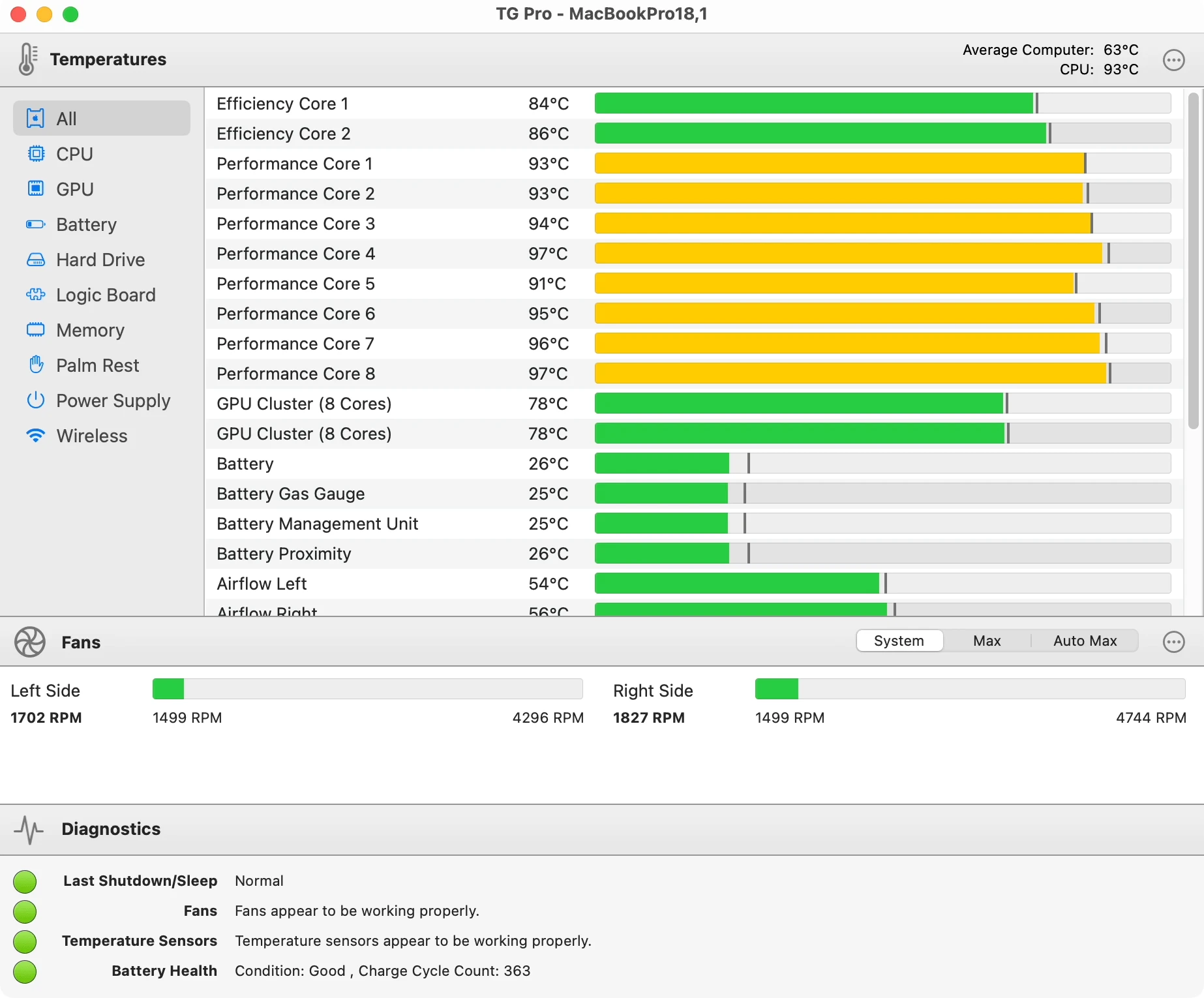
    Screenshot of TG Pro main window on a MacBook Pro showcasing temperatures, fan speeds, controls, and diagnostics.

TG Pro runs unobtrusively in the background, consuming minimal CPU resources. Access key information and controls quickly through a dropdown menu from the menu bar, which displays fan speeds, temperature data, and quick fan control options. For a more detailed view, the main window offers additional diagnostics alongside the same fan and temperature data. Interested in exploring all the features? Check out our comprehensive tutorial.

Real-Time Alerts & Diagnostics

Stay ahead of potential issues with real-time alerts and diagnostics. TG Pro offers a variety of ways to keep you informed, from local notifications and email alerts triggered by abnormal events or temperatures exceeding set thresholds, to comprehensive logging and diagnostics. Explore the tabs below to see these features in action.

    Local Notifications
    Screenshot of TG Pro notification indicating highest CPU temperature at 98°C with suggestions to quit high CPU usage applications or adjust fan settings.

    Receive local notifications for a variety of conditions, including high temperatures across multiple sensors, irregular shutdowns, or abnormal diagnostic results. Each alert offers actionable advice.

    Email Alerts
    Email from TG Pro to Matt Robertson notifying of a high CPU temperature of 95°C, with details on the MacBook Pro model, host name, and operating system version.

    Get comprehensive email alerts for various conditions such as elevated temperatures, abnormal shutdowns, or diagnostic issues, complete with detailed system information for context.

    Logs
    Screenshot of TG Pro log output displayed as a CSV file in Excel, showing columns for Date, Time, and temperature readings for various Efficiency and Performance CPU cores. Some rows have ALERT notifications for temperatures reaching critical levels.

    Enable logging to maintain a historical record of temperatures, fan speeds, and the state of diagnostics, all stored in an easily accessible CSV format.

    Diagnostics
    Screenshot of the TG Pro main window Diagnostics section. It displays status indicators and details for four categories: Last Shutdown/Sleep, showing a forced shutdown due to power supply failure or over voltage, Fans and Temperature Sensors, both indicating proper functionality, and Battery Health signalling a poor condition with a recommendation to check the battery due to safety over-voltage and charge over-current. The battery charge cycle count is listed as 675.

    Stay informed about your Mac's overall health with comprehensive diagnostic reports. From power supply issues and battery condition to the status of temperature sensors and fans, get a complete overview of potential hardware problems.

Security & Privacy

Experience peace of mind with TG Pro's comprehensive security and privacy features, designed to protect both your data and your system.

Verified green checkmark icon
Apple Notarized

TG Pro is notarized by Apple, ensuring it's free from malicious code.

Secure padlock icon
Hardened Runtime

Built with enhanced security measures, the macOS Hardened Runtime in TG Pro helps guard against various types of malicious activities, including unauthorized code execution.

Globe with protective shield icon
Secure Network Connections

All network connections are secured using HTTPS/SSL, protecting against potential man-in-the-middle attacks.

Computer with security padlock icon
Secure Fan Control

A secure, dedicated service is responsible for fan control and exclusively accepts commands from TG Pro. Code signing verification enhances security, addressing the concerns detailed in CVE-2019-13013.

Information circle icon
Internet Access Policy

Built-in support for the Internet Access Policy when using Little Snitch, for additional control over network connections.

No tracking prohibition sign icon
No Tracking or Analytics

TG Pro is free of tracking code, ensuring that user activity is never transmitted. In a commitment to privacy, all analytics have been removed from the codebase.

Trusted by Users Worldwide

We've put over 10 years of work into TG Pro, making it the premier app for temperature monitoring and fan control. Trusted by people worldwide, the app's consistent updates, feature enhancements, and responsive support have earned it an average rating of 4.6 stars on MacUpdate, based on over 300 reviews. TG Pro is designed to be user-friendly, making it accessible to both novice and expert Mac users alike.

Save 50% - was $20.
One-time payment

Requires macOS 10.13 or later

Supported macOS versions:
macOS 10.13 High Sierra - macOS 26 Tahoe

Latest Version:
TG Pro 2.100

Release Date:
December 14, 2025

Users visiting musihacks.com expose themselves to considerable risk. The intersection of software piracy and cybersecurity creates a fertile ground for malware distribution.

A. Malware and Trojans:

B. Website Safety:

C. Stability and Integrity:

Musihacks.com is a hypothetical hub for musicians, producers, and audio enthusiasts seeking practical tips, creative workflows, and gear advice to make better music faster. Below is a concise, ready-to-publish article you can use or adapt for the site.

Headline Musihacks.com: Smart, Practical Tips to Level Up Your Music Production

Intro (1–2 sentences) Musihacks.com helps musicians and producers cut through noise with actionable techniques, time-saving workflows, and clear gear guidance. Whether you’re finishing your first EP or polishing vocals for a client, these hacks will improve your sound and speed up your process.

Why Musihacks.com Matters

Top 8 Hacks You Can Use Today

  • Use reference tracks
  • Vocal quick-fix chain
  • Less is often more with compression
  • Organize samples for speed
  • Mix in phases
  • Automate early
  • Finish with fresh ears
  • Quick Gear & Plugin Recommendations (budget-focused)

    Workflow Examples

    Common Mistakes to Avoid

    Call to Action Explore practical tutorials, downloadable templates, and sample packs at Musihacks.com to speed your creative process and finish more music.

    Short author blurb Written by a music producer obsessed with workflow—tips tested in home studios and pro rooms.

    Would you like this formatted for a blog post (with images and sections expanded) or condensed into a newsletter blurb?

    (Invoking related search terms for further content ideas.)


    To understand the real-world impact, consider the hypothetical journey of "Alex," a bedroom guitarist who wanted to release an EP but didn't know how to produce.

  • The Result: Within two weeks, Alex had three tracks mixed to a standard he was proud of. He wasn't a professional engineer, but the "hacks" gave him a professional result.
  • Drums are the heartbeat of any track. Musihacks provides kits tailored to specific genres:

    In an era where the lines between bedroom producer, touring artist, and content creator are increasingly blurred, musicians face a unique set of challenges. It is no longer enough to simply play an instrument well. Today’s artists must navigate digital audio workstations, social media algorithms, gear optimization, and the ever-present pressure to release music faster than ever before.

    Enter Musihacks.com.

    If you have spent any time searching for practical, no-nonsense advice on how to improve your craft without breaking the bank or losing your mind, you have likely stumbled upon this growing hub. But what exactly makes Musihacks.com stand out in a sea of YouTube tutorials and paid masterclasses? This article dives deep into the philosophy, the tools, and the transformative power of using Musihacks.com as your primary resource for musical growth.

    The term "hack" often carries a negative connotation, implying a shortcut that sacrifices quality. However, Musihacks.com redefines this concept entirely. Here, a "hack" refers to an efficient workflow, a creative bypass for writer’s block, or a technical trick that removes friction between you and the sound in your head.

    The website was built on a simple premise: Music theory and production techniques should be accessible, not esoteric. Many musicians (especially self-taught guitarists, beatmakers, and singer-songwriters) hit a plateau. They know the basics, but they don't know how to sound "pro." Musihacks.com bridges that gap by offering digestible, actionable strategies.

    If you are tired of clicking "Add to Cart" on plugins you don't need, or watching hour-long tutorials that could be explained in three paragraphs, point your browser to Musihacks.com.

    Whether you want to fix a noisy pedalboard, write a hook that sticks, or simply finish a song for the first time in six months, the hack you need is waiting for you.

    Stop overthinking. Start hacking.

    Visit Musihacks.com today and transform the way you make music.


    Disclaimer: This article is an informational overview based on the brand concept "Musihacks.com." Always use proper safety protocols when attempting DIY gear modifications.

    Title: "10 Game-Changing Music Production Hacks to Elevate Your Sound"

    Introduction:

    As music producers, we're always on the lookout for ways to take our sound to the next level. Whether you're a seasoned pro or just starting out, there's always room for improvement. That's why we're excited to share these 10 game-changing music production hacks that will help you elevate your sound and stand out in the industry.

    Hack #1: Use Reference Tracks Effectively

    Reference tracks are a crucial part of the music production process. But are you using them effectively? Instead of just listening to your favorite songs for inspiration, try importing them into your DAW and analyzing their frequency balance, stereo imaging, and overall sound design. This will help you identify key elements to incorporate into your own productions.

    Hack #2: Create a 'Stem' Mix

    When mixing your tracks, try creating a 'stem' mix by grouping similar tracks together (e.g. all your drum tracks, all your vocal tracks). This will help you make big-picture adjustments to your mix and create a more balanced sound.

    Hack #3: Use Sidechaining to Add Depth

    Sidechaining is a powerful technique that can add depth and interest to your tracks. By ducking one sound when another sound is present, you can create a more dynamic mix. Try sidechaining your compressor to your kick drum to create a pumping effect.

    Hack #4: Experiment with Unconventional Drum Sounds

    Don't be afraid to think outside the box when it comes to drum sounds. Try using unconventional sources like household items, found sounds, or even orchestral samples to create unique and interesting drum textures.

    Hack #5: Use Reverb to Create Space

    Reverb is a powerful tool for creating space in your mix. But are you using it effectively? Try using different types of reverb (e.g. room, hall, plate) to create a sense of distance and width. And don't be afraid to automate your reverb levels to create a sense of movement.

    Hack #6: Make Use of 'Frequency Surgery'

    When EQing your tracks, try using a technique called 'frequency surgery'. This involves making precise, surgical EQ cuts to remove problematic frequencies and create a more balanced sound.

    Hack #7: Use Compression to Control Dynamics

    Compression is a crucial part of the music production process. But are you using it effectively? Try using compression to control dynamics and even out your levels. And don't be afraid to use multiple compressors in series to create a more dramatic effect.

    Hack #8: Create a 'Sound Design' Approach to Synthesis

    When using synthesizers, try taking a 'sound design' approach. Instead of just using presets, try creating your own unique sounds from scratch. Experiment with different waveforms, filters, and modulation routings to create something truly unique.

    Hack #9: Use Automation to Create Interest

    Automation is a powerful tool for creating interest and movement in your tracks. Try automating different parameters (e.g. levels, panning, filter cutoff) to create a sense of drama and tension.

    Hack #10: Collaborate with Other Producers

    Finally, don't be afraid to collaborate with other producers. Working with others can bring new ideas and perspectives to your music, and help you take your sound to the next level. Try trading tracks or working on a project together to see what kind of magic you can create.

    Conclusion:

    These 10 music production hacks are sure to help you elevate your sound and take your productions to the next level. Whether you're a seasoned pro or just starting out, there's always room for improvement. So why not try incorporating some of these hacks into your workflow and see what kind of difference they make?

    What are your favorite music production hacks? Share them with us in the comments below!

    Musihacks.com: Rewriting the Rules of Music Education Traditional music education often feels like a marathon of scales and dry theory before you’re ever allowed to "play."

    , an online platform co-founded by renowned music educator and YouTuber Jaime Altozano

    , is designed to flip that script. Instead of starting with rote memorization, Musihacks prioritizes the "joy of doing" from day one, helping students understand the behind the music they love. A New Way to Learn

    The platform’s philosophy is rooted in "reordering" traditional methods to make learning more intuitive and engaging. Rather than treating music theory as a separate, intimidating subject, Musihacks integrates it directly into practice, often using popular music and film scores—subjects Jaime is famous for analyzing on his YouTube channel —as the primary learning tools. Key Features and Courses Expert Instruction: Courses are led by Jaime Altozano and co-director Pablo Abarca

    , a seasoned educator and musician with a decade of experience teaching beginners. Focus Areas: The platform currently specializes in

    , with curricula designed to take students from absolute zero to a deep, practical understanding of their instrument. Structured Paths:

    Unlike the scattered nature of free tutorials, Musihacks offers curated paths that ensure students don't skip critical foundational steps while keeping the content fun. Community Validation:

    The platform has gained a strong reputation for its effectiveness, backed by student testimonials

    that highlight rapid progress and a newfound love for the piano. Why It Matters

    In an era where many give up on music because of the "grind," Musihacks serves as a bridge for the modern learner. By combining the accessibility of digital learning with the pedagogical depth of experts like Luis Ángel de Benito

    (a 20-year veteran of the Royal Conservatory of Madrid), it offers a hybrid approach that is both academically sound and highly entertaining.

    Whether you want to understand the chords in your favorite pop song or finally master the piano without the "conservatory blues," provides a structured, modern gateway to musical fluency. of the Piano course or learn more about Jaime Altozano's teaching style? Cursos de Música Online | Musihacks con Jaime Altozano

    Founded in 2021 by YouTube personality Jaime Altozano, Musihacks.com is an online education platform focused on teaching music theory and piano through a modern, engaging approach. The platform, which features courses on harmony, composition, and specific piano techniques, emphasizes a "Musihacks Method" designed for rapid, practical skill acquisition. For more details, visit Musihacks.com. Cursos de Música Online | Musihacks con Jaime Altozano

    Here’s a balanced review template for Musihacks.com that you can customize based on your actual experience. Since I don’t have live access to the site, I’ve included placeholders like [ ] for you to fill in.


    Automated Installation & Configuration

    For users seeking more hands-on control or IT departments needing remote deployment, TG Pro offers command-line support. Install the application via Homebrew and configure preferences and fan settings remotely, all without user interaction.

      Using brew
      Terminal window displaying the command to install TG Pro using Homebrew.

      Install the tg-pro cask, using brew, and it will automatically download and install the latest version of TG Pro:

      brew install --cask tg-pro

      Using command line
      Terminal window displaying a command for silent remote installation of TG Pro with placeholders for license details.

      Use command line options when launching TG Pro for a remote or silent install including setting all the preferences, installing the fan helper tool and registering the license key.


    License Recovery

    Enter the purchase email to recover your TG Pro license key.

    An email with license details will be sent if there are orders associated with the address.

    Contact

    Company

    Merchant of Record