ultrasurf.exe is a powerful, nimble tool that has helped millions bypass censorship. For quick, anonymous web browsing from a USB stick, it is one of the best portable solutions ever created. However, it is not a security product—it is an evasion product. treat it as a disposable privacy tool, not a permanent security solution. Always download the .exe from the official source, run it as a limited user when possible, and never trust it with your passwords.
Disclaimer: This article is for educational purposes only. Bypassing internet restrictions may violate local laws. You are responsible for your own compliance.
The Ghost in the Machine: The Duality of Ultrasurf.exe The file ultrasurf.exe is a paradox wrapped in an executable. Since its inception by UltraReach Internet Corp., it has lived two lives: one as a heroic gateway to information for those behind digital firewalls, and another as a "stealth" nightmare for cybersecurity purists. 1. The Beacon of Digital Freedom
For millions living under strict internet censorship—from students on restricted college campuses to citizens in nations with heavy firewalls—ultrasurf.exe is a vital tool for liberty. Unlike traditional VPNs that rely on easily targeted protocols like OpenVPN, Ultrasurf disguises its traffic to look like normal web browsing, making it exceptionally difficult for censors to block. It offers "three pillars" of freedom:
Privacy: It hides IP addresses and wipes browsing history automatically upon exit.
Security: It provides high-level encryption for data exchange, ostensibly protecting sensitive credentials.
Simplicity: It requires no installation. You simply double-click the .exe, and the digital world opens. 2. The Cybersecurity Skepticism
However, the very features that make it effective for bypassing censorship make it a "black box" of concern for security researchers. Its behavior is often described as "malware-like" because it is designed to be nearly undetectable.
Stealth Tactics: It uses heuristic avoidance and encrypted payloads to bypass standard virus scanners.
Man-in-the-Middle Risks: Some audits have found that Ultrasurf promotes potential security gaps by allowing mismatched or self-signed SSL certificates without notifying the user.
The Trust Gap: Because it is closed-source, organizations like The Tor Project have audited it out of concern that users were being encouraged to use it without objective proof of its safety. 3. The Portability Paradox
The ultimate appeal of ultrasurf.exe is its portability. In a world where administrative privileges are the gatekeepers of software, a single executable that runs from a thumb drive is revolutionary. It represents a grassroots resistance to the "walled gardens" of the modern internet. Yet, this ease of use is a double-edged sword; it bypasses the security policies of workplaces and schools, creating a constant "cat-and-mouse" game between users and network administrators. Conclusion
ultrasurf.exe is more than just a proxy; it is a cultural artifact of the internet age. It sits at the intersection of human rights and technical risk. Whether it is viewed as a "life-saving" tool for freedom of speech or a "stealthy" security vulnerability depends entirely on which side of the firewall you are standing on. Ultrasurf: the definitive review | The Tor Project
An Analysis of Ultrasurf: Privacy, Censorship Circumvention, and Digital Freedom
Digital censorship and surveillance have become defining challenges of the modern internet era. Governments, academic institutions, and corporate entities routinely restrict access to information and monitor user activity. In this landscape, specialized software tools have emerged to protect user privacy and bypass these digital roadblocks. One of the most recognizable and enduring tools in this category is Ultrasurf, distributed primarily as the executable file ultrasurf.exe. Originally developed to help internet users in China bypass the "Great Firewall," Ultrasurf has evolved into a globally utilized anti-censorship tool. This essay examines the mechanics of Ultrasurf, its practical utility, and the security considerations users must weigh when deploying it. The Mechanics of Ultrasurf
At its core, Ultrasurf is a lightweight, proxy-based circumvention tool designed for the Microsoft Windows operating system. Unlike complex Virtual Private Networks (VPNs) that require extensive installation processes and administrative privileges, ultrasurf.exe is a portable executable. This means it can be run directly from a USB flash drive or a local folder without being installed on the host machine.
When a user launches the executable, the software automatically creates an encrypted Transport Layer Security (TLS) tunnel between the user’s computer and a network of proxy servers managed by Ultrareach, the parent company. This tunnel achieves two primary objectives:
IP Masking: It hides the user's real IP address from the websites they visit, replacing it with the IP address of the Ultrasurf proxy server.
Traffic Encryption: It encrypts the data moving between the user and the proxy server, making it difficult for local network administrators or Internet Service Providers (ISPs) to inspect the content of the traffic or determine which specific websites are being accessed.
Historically, Ultrasurf was tightly integrated with Internet Explorer, automatically configuring the browser's proxy settings upon launch. In newer iterations, it has expanded to support other major browsers like Google Chrome and Mozilla Firefox, often through dedicated browser extensions that complement the standalone executable. Practical Utility and Benefits
The primary appeal of Ultrasurf lies in its accessibility and specific design focus. It remains a popular choice for several key reasons:
Zero Installation and Portability: Because it does not require installation or administrator rights, it is ideal for use on restricted computers, such as those in public libraries, internet cafes, or locked-down corporate environments.
Ease of Use: The interface is intentionally minimalist. Upon opening the file, the software automatically searches for the fastest available proxy server and connects. No complex configuration of ports or protocols is required from the user.
High Performance in Censored Regions: Ultrasurf's developers actively update the software to counter blocking efforts by sophisticated state censors. It utilizes advanced obfuscation techniques to make its traffic look like normal HTTPS web browsing, allowing it to bypass deep packet inspection. Security Limitations and Criticisms ultrasurf.exe
While Ultrasurf is an effective tool for bypassing censorship, it is not a silver bullet for digital privacy, and users must understand its limitations to avoid a false sense of security.
Proxy vs. VPN: Ultrasurf is a proxy, not a full-system VPN. While a VPN encrypts all internet traffic leaving a device (including background apps, email clients, and system updates), Ultrasurf primarily secures web browser traffic. Traffic from other applications may still leak over the local network unencrypted.
Centralized Trust: Unlike decentralized networks like Tor, which route traffic through multiple random nodes to ensure no single entity knows both the source and destination of the data, Ultrasurf relies on a centralized network of servers owned by Ultrareach. Users must place complete trust in the company not to log their browsing data or yield to legal pressures to reveal user identities.
Closed Source Nature: Ultrasurf is proprietary, closed-source software. The broader cybersecurity community cannot independently audit its source code to verify its security claims or check for potential vulnerabilities and backdoors. This lack of transparency has historically drawn criticism from digital rights advocates who prefer open-source alternatives like Tor or OpenVPN. Conclusion
The standalone executable ultrasurf.exe represents a milestone in the ongoing battle between digital censors and internet freedom advocates. Its lightweight design, portability, and aggressive anti-blocking capabilities have made it a lifeline for millions of users living under oppressive regimes or restrictive network policies. However, its utility is strictly defined by its scope. It is an excellent tool for quick censorship circumvention and basic web privacy, but it should not be mistaken for a comprehensive, high-anonymity security solution. Users requiring absolute anonymity or full-system encryption should look toward audited, open-source decentralized networks. Ultimately, Ultrasurf stands as a testament to the demand for accessible tools that empower individuals to reclaim their right to freely access information.
Ultrasurf.exe is the core executable file for UltraSurf, a popular and long-standing freeware anti-censorship tool developed by UltraReach Internet Corp. Originally designed in 2002 to help internet users in China bypass the "Great Firewall," it has since evolved into a global tool used by millions to access blocked content, protect privacy on public Wi-Fi, and hide IP addresses. Key Features and Functionality
Unlike traditional VPNs that require full installation, ultrasurf.exe is a standalone, portable application.
No Installation Required: You can run the program directly from a USB drive without leaving traces on the host computer's registry or file system.
Encrypted Tunneling: It creates an encrypted HTTP tunnel between your device and a central pool of proxy servers.
Dynamic IP Shifting: The software frequently changes proxy server IP addresses—sometimes thousands of times per hour—to stay ahead of government or institutional blocks.
Automatic Browser Configuration: By default, it automatically configures Internet Explorer or Chrome to use its proxy settings. How to Use Ultrasurf.exe
Using the tool is designed to be a "one-click" experience for users who may not be tech-savvy. Support - Ultrasurf
Ultrasurf.exe: A Comprehensive Overview
Ultrasurf.exe is an executable file associated with UltraSurf, a free, web proxy service developed by UltraSurf China. The software allows users to browse the internet anonymously and access geo-restricted content by routing their internet traffic through a network of proxy servers.
Functionality and Features
Ultrasurf.exe is the primary executable file of the UltraSurf software. When installed, it enables users to:
The software uses a combination of proxy servers and encryption to ensure secure and anonymous browsing. Ultrasurf.exe can be installed on Windows-based systems and is often used by individuals seeking to protect their online privacy or access restricted content.
How it Works
Here's a simplified overview of the process:
Safety and Security Considerations
While Ultrasurf.exe can provide a level of anonymity and security, it's essential to be aware of the following:
Best Practices and Recommendations
To use Ultrasurf.exe safely and effectively: ultrasurf
In conclusion, Ultrasurf.exe is a useful tool for those seeking to protect their online anonymity and access restricted content. However, it's crucial to be aware of the potential risks and take necessary precautions to ensure safe and secure usage.
Understanding Ultrasurf.exe: A Tool for Digital Freedom and Privacy Ultrasurf.exe
is the primary executable file for Ultrasurf, a popular freeware internet censorship circumvention tool developed by UltraReach Internet Corporation
. Originally designed to help users in China bypass the "Great Firewall," it has since become a global tool used to access restricted content and protect user privacy. What is Ultrasurf.exe?
Unlike traditional Virtual Private Networks (VPNs) that use specific protocols like OpenVPN, Ultrasurf operates as a proxy-based system
. It creates an encrypted tunnel between the user’s computer and a pool of proxy servers, making the traffic appear as standard HTTPS web traffic to bypass sophisticated filters.
file is a standalone, "portable" application, meaning it does not require a formal installation process. Users can run it directly from a USB drive or a local folder, making it a preferred choice for individuals using public or restricted computers at schools or workplaces. Core Features and Benefits Censorship Circumvention
: Effectively bypasses government, corporate, and campus-level firewalls to reach blocked websites and social media platforms. IP Masking
: When active, it replaces the user's real IP address with that of one of its proxy servers, providing a layer of anonymity. Encrypted Traffic
: It encrypts data between the user's browser and the Ultrasurf servers, which is particularly useful for security on public Wi-Fi. Ease of Use
: The interface is minimal, often consisting of just a "Connect" toggle and status indicators. Key Limitations and Security Considerations
While Ultrasurf is a powerful tool for accessibility, it has specific drawbacks compared to premium VPN services: Browser-Level Protection Only
: The Ultrasurf.exe client typically only secures traffic going through the web browser. Other applications (like gaming clients or system updates) may still leak the user's real IP. Closed-Source Nature
: The software is closed-source, meaning security researchers cannot independently audit its code to verify privacy claims. Performance
: Because it relies on a network of proxy servers that handle high volumes of traffic, connection speeds can be significantly slower than paid VPNs. Antivirus False Positives : Some antivirus programs flag ultrasurf.exe
as a threat because its behavior—bypassing network filters—mimics that of certain types of malware. Users often have to manually add an exception to their security software to use it. How to Use It Safely
For those looking to use Ultrasurf, it is highly recommended to download the file directly from the Official Ultrasurf Website
to avoid tampered versions that might contain actual malware. For users who prefer a more integrated experience, Ultrasurf also offers a Chrome Web Store extension If you'd like to explore how to set this up, tell me: If you need a step-by-step guide for the Windows application or the browser extension. If you're looking for alternatives for a specific platform (like mobile or Mac).
UltraSurf Security, Privacy & Freedom VPN - Chrome Web Store
ultrasurf.exe is the executable file for Ultrasurf, a free, portable circumvention tool used to bypass internet censorship and protect online privacy. Originally designed to bypass the "Great Firewall" of China, it is now used globally to access restricted content on school, work, or government networks. 🛡️ Key Features
Portability: No installation is required; you can run the .exe directly from a USB drive.
Censorship Bypass: Uses advanced techniques to tunnel through firewalls and unblock restricted websites.
Privacy Protection: Hides your real IP address from websites and encrypts your traffic using TLS tunnels. The software uses a combination of proxy servers
Auto-Cleanup: Automatically clears browsing history and cookies in Internet Explorer upon exiting.
Safe Browsing: Includes an optional feature to block known phishing, malware, and scam sites. ⚙️ How It Works
Proxy Logic: It primarily functions as a proxy rather than a full-system VPN, meaning it mostly affects browser traffic.
Ease of Use: Features a "one-click" connection; once launched, it often opens your default browser automatically.
Browser Support: While it auto-configures Internet Explorer, other browsers like Firefox or Chrome may require manual configuration to use localhost:9666. ⚠️ Important Considerations
UltraSurf Security, Privacy & Freedom VPN - Chrome Web Store
ultrasurf.exe is the standalone executable file for the UltraSurf proxy software. Unlike traditional VPN clients (like NordVPN or ExpressVPN) that require installation, drivers, and background services, UltraSurf is a portable executable. This means you do not need to install it. You simply download the .exe file, double-click it, and it runs directly from your desktop or USB drive.
Key characteristics of ultrasurf.exe:
Many antivirus engines flag ultrasurf.exe as a riskware, hacktool, or potentially unwanted program (PUP). Why? Because it modifies proxy settings—a behavior also common in malware that hijacks browsers.
Examples of detections:
Verdict: Legitimate versions are not viruses. However, fake ultrasurf.exe files are common on third-party download sites. Always download from the official source (ultrasurf.us).
How to use ultrasurf.exe:
ultrasurf.exe – Your Gateway to an Open Web
Have you ever hit a “blocked” page or felt like someone was watching your browsing?
ultrasurf.exe is a tiny, portable program that fits on a USB stick. No install, no settings to fiddle with. Just double‑click it, and within seconds your traffic is encrypted and rerouted through a global proxy network.
What it does well:
Heads‑up:
Because it tunnels around local security policies, some antivirus programs will raise an alert. That’s usually a false positive based on how it works, not what it does. Still – never run it on a work computer without explicit permission, and only download from the official source.
Bottom line: Great for personal privacy on public Wi‑Fi or travel to restricted regions. Handle with care in corporate environments.
Run ultrasurf.exe if:
Do NOT run ultrasurf.exe if:
Because of its popularity, cybercriminals distribute malware disguised as UltraSurf. Here’s how to spot a fake:
| Red Flag | Legitimate ultrasurf.exe | Fake/Malware |
| :--- | :--- | :--- |
| File Size | ~1–2 MB | Over 5 MB or under 500 KB |
| Digital Signature | Signed by "UltraReach Internet Corp" | Unsigned or fake signer |
| Network Behavior | Connects only to ports 80, 443, 9666 | Connects to IRC, unknown C2 servers |
| Persistence | No registry changes (portable) | Adds startup entries, scheduled tasks |
| Browser Changes | Only proxy settings | Changes homepage, installs extensions |
Actionable Steps:
In the vast landscape of internet privacy tools, few names have carried as much weight and controversy as UltraSurf. Developed by UltraReach Internet Corporation, this application has been a go-to solution for users in heavily censored regions for nearly two decades. But if you’ve spotted ultrasurf.exe running in your Task Manager or are considering downloading it, you need the full picture.
This article dives deep into the ultrasurf.exe process, its functionality, security implications, performance metrics, and legitimate alternatives.
Wir freuen uns, MPS Sonnenstudio Köln GmbH als neues Genossenschaftsmitglied bei kinofreund begrüßen zu dürfen.

kinofreund ist ein professionelles Netzwerk für die Filmbranche. Gemeinsam bündeln wir Ressourcen und Energie, damit wir nicht allein und “klein” bleiben, sondern zusammen “groß” werden! Erfahre mehr »
Video ansehen!Eine übersichtliche und leicht zu bedienende Filmverwaltung ist die Grundlage für produktives Arbeiten. Denn bei kinofreund Mitgliedern soll die Kreativität an erster Stelle stehen.
Während des Produktionsprozesses sind die WEBDAILIES ein praktisches Tool zur Sichtung von Filmmaterial. Das FILMPORTAL bietet Kinobetreibern und Verleihern eine Plattform um Trailer, Screener sowie Pressematerial zu verwalten und herunterzuladen.

Nie wieder Chaos? Mit der eigens entwickelten kinofreund Versandbox bringen wir Ordnung und Struktur in Deine Regale. kinofreund vervielfältigt Deine Filme und organisiert Deinen FILMVERSAND. Wir begleiten dich außerdem bei Deinen Kinovorführungen.
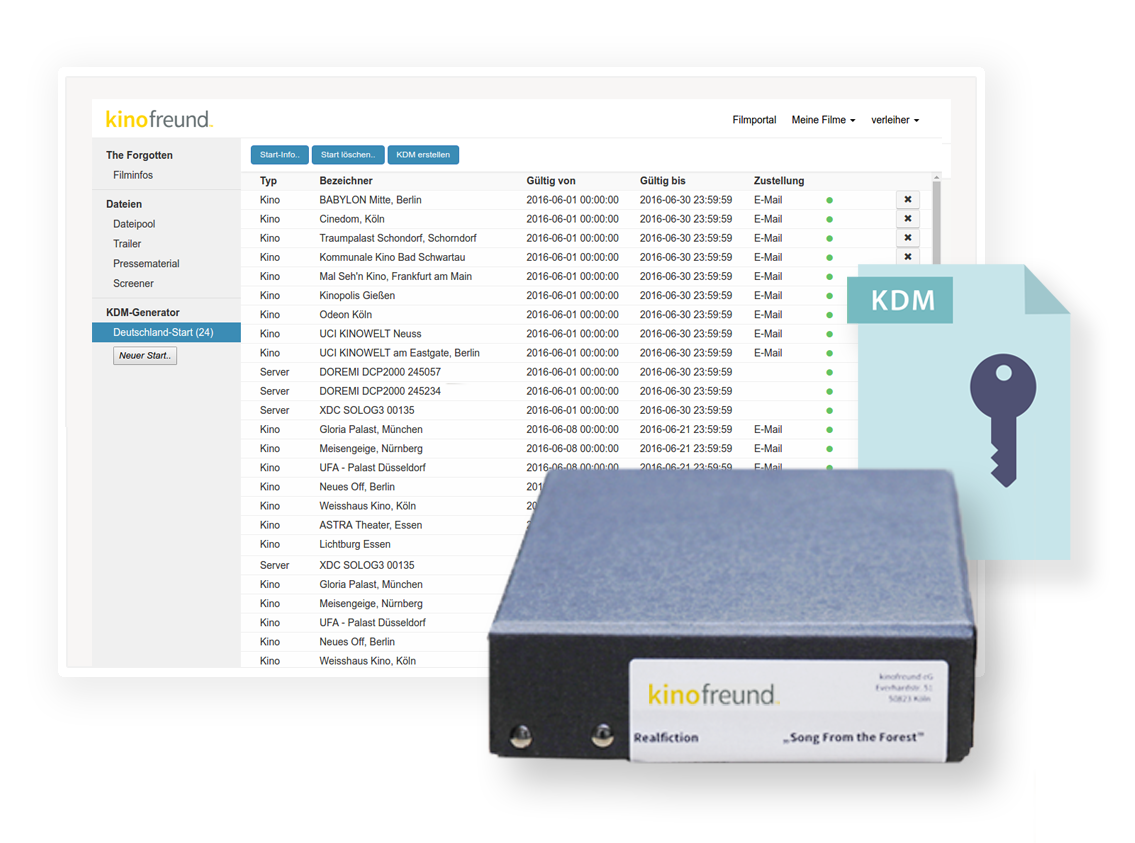
kinofreund bietet Dir ein FILMARCHIV zur langfristigen Speicherung Deiner digitalen Filmprojekte - offline, sicher & jederzeit einsehbar! Wir lagern Deine Daten dauerhaft an 3 verschiedenen Standorten in Deutschland. Vom Kurzfilm bis hin zum Feature-Projekt mit großem Speicherbedarf, finde Dein passendes Angebot!

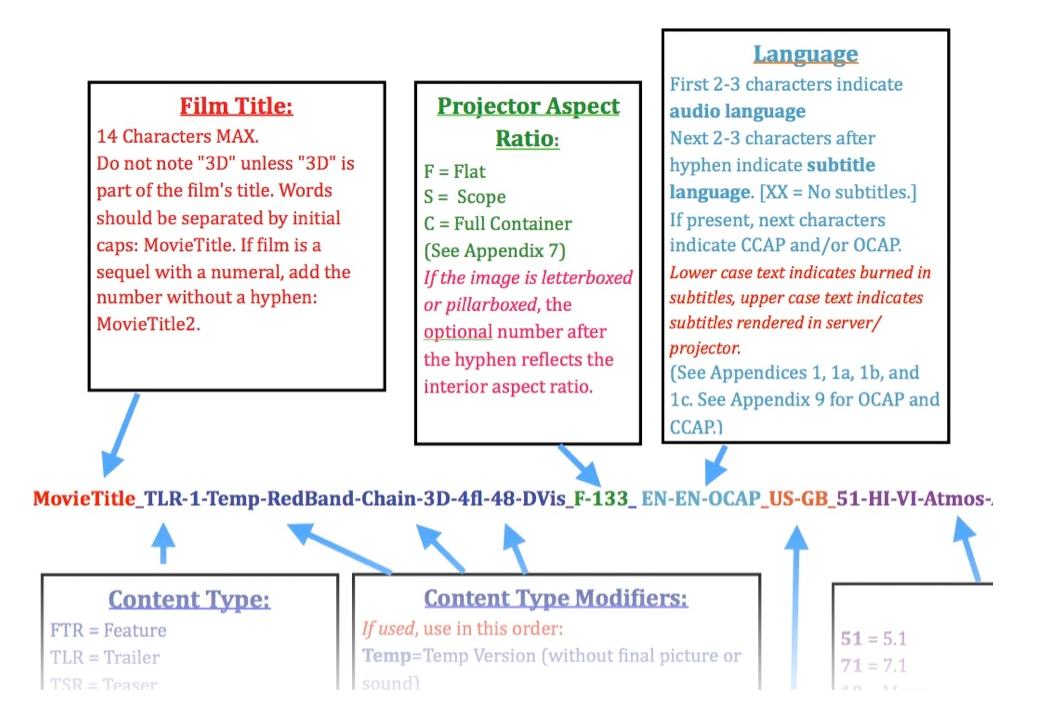
Wir sehen einen großen Bedarf in der Branche, die Benennung von Dateien zu standardisieren. Unsere NOMENKLATUR soll dafür eine leicht verständliche und einheitliche Grundlage schaffen.
Mit dem DCP NAMING TOOL bieten wir Dir ein öffentliches und kostenloses Online-Werkzeug zum Auslesen sowie zur Erstellung von DCP Dateinamen.
Bei kinofreund kannst Du ganz einfach Genosse werden. Fülle den Mitgliederantrag aus und profitiere noch heute von den besonders günstigen Genossenpreisen!
Jetzt Genosse werden!kinofreund eG
Everhardstr. 51
50823 Köln
FON: +49 (0) 221 951559-20
FAX: +49 (0) 221 951559-15
info@kinofreund.com